Çalışmıyor Paladins Free Hack - Aimbot, Visual, Misc 2023

cashcooper10

Confirmed Memb.
Katılım
24 Eyl 2022
Konular
6
Mesajlar
74
Tepkime puanı
5
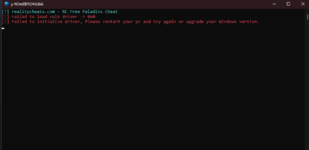
it does not work for me, it gives me this error I updated my pc and am on the latest windows version, the only thing i can think of why it might not work is i changed windows 64 to windows 32 becuase it would not let me play on 64 but on 32 it does

1687582792418.png
 

cashcooper10

Confirmed Memb.
Katılım
24 Eyl 2022
Konular
6
Mesajlar
74
Tepkime puanı
5
could you make it work for windows 32? the game won't let me launch it on 64 so i have to change it to 32 it does not work for 64 for both steam and epic the only way for this cheat to work for me is if you make it work for 32 so could you please
 

Osderda

>.....
Admin
Katılım
19 Eyl 2019
Konular
49
Mesajlar
3,354
Çözümler
841
Tepkime puanı
7,341
Konum
X399+WF3 Kadıköy, İstanbul
Web sitesi
osderdadev.com
could you make it work for windows 32? the game won't let me launch it on 64 so i have to change it to 32 it does not work for 64 for both steam and epic the only way for this cheat to work for me is if you make it work for 32 so could you please
Hi cashcooper10,
First you need to check is the Windows version, If you are using Windows 11 22h2 operating system
In Windows 11 22H2 and future versions, our kernel cheats will not work. Windows blacklists signature of Intel vulnerable driver
and therefore users of that version will face "Failed to load vuln driver" error. To resolve this issue, you can follow these steps:
  1. Open Windows Security from the start menu.
  2. Go to Device Security.
  3. In the Core Isolation option, turn off the Memory Integrity and Microsoft Vulnerable Driver Blocklist options. (https://prnt.sc/QXqFe320IKQZ)
  4. If the problem still persists, start cmd as administrator and enter the following codes:
    • reg add "HKLM\SYSTEM\CurrentControlSet\CI\Config" /v "VulnerableDriverBlocklistEnable" /t REG_DWORD /d 0 /f

    • reg add "HKLM\SYSTEM\CurrentControlSet\Control\CI\Config" /v "VulnerableDriverBlocklistEnable" /t REG_DWORD /d 0 /f
  5. Restart your computer.
Thus, you will have solved the Failed to vuln driver error.

Set your game to 64 bit from EasyAntiCheat folder and right click Paladins from your steam library. Properties-> General-> Launch Options input paste the following code. Try again game and Cheat launch.:

Kod:
cmd /c "set OPENSSL_ia32cap=:~0x20000000 && %command%"

Enjoy!
 

enestorpil414

Ultra Member
Katılım
14 Ağu 2019
Konular
12
Mesajlar
332
Tepkime puanı
22
Yaş
21
ne zaman canım sıkılsa İlahi rc bana oyun oynattırıyor
 

darkns101

Active Member
Katılım
16 Nis 2023
Konular
1
Mesajlar
24
Tepkime puanı
0
merhaba hileyi aktif ettim fakat son denediğimde çalıştıramadım, oyuna girince KONSOL'a gelip derken KONSOL'a NASIL GELİNİYOR YARDIM LÜTFENNN!!
 
Moderatör tarafında düzenlendi:

Osderda

>.....
Admin
Katılım
19 Eyl 2019
Konular
49
Mesajlar
3,354
Çözümler
841
Tepkime puanı
7,341
Konum
X399+WF3 Kadıköy, İstanbul
Web sitesi
osderdadev.com
merhaba hileyi aktif ettim fakat son denediğimde çalıştıramadım, oyuna girince KONSOL'a gelip derken KONSOL'a NASIL GELİNİYOR YARDIM LÜTFENNN!!
O konsol Hileyi başlattığınız konsoldur. Oyunu kapatın, hileyi başlatın, "Waiting paladins" yazısı geldiğin de oyunu başlatın ve lobide klavyenizden F8 tuşuna basın. Arkada yeni pencere açılacaktır, o pencere hile menüsüdür. Hilenizi oradan ayarlayabilirsiniz.
 

cashcooper10

Confirmed Memb.
Katılım
24 Eyl 2022
Konular
6
Mesajlar
74
Tepkime puanı
5
Hi cashcooper10,
First you need to check is the Windows version, If you are using Windows 11 22h2 operating system
In Windows 11 22H2 and future versions, our kernel cheats will not work. Windows blacklists signature of Intel vulnerable driver
and therefore users of that version will face "Failed to load vuln driver" error. To resolve this issue, you can follow these steps:
  1. Open Windows Security from the start menu.
  2. Go to Device Security.
  3. In the Core Isolation option, turn off the Memory Integrity and Microsoft Vulnerable Driver Blocklist options. (https://prnt.sc/QXqFe320IKQZ)
  4. If the problem still persists, start cmd as administratorand enter the following codes:
    • reg add "HKLM\SYSTEM\CurrentControlSet\CI\Config" /v "VulnerableDriverBlocklistEnable" /t REG_DWORD /d 0 /f

    • reg add "HKLM\SYSTEM\CurrentControlSet\Control\CI\Config" /v "VulnerableDriverBlocklistEnable" /t REG_DWORD /d 0 /f
  5. Restart your computer.
Thus, you will have solved the Failed to vuln driver error.

Set your game to 64 bit from EasyAntiCheat folder and right click Paladins from your steam library. Properties-> General-> Launch Options input paste the following code. Try again game and Cheat launch.:

Kod:
cmd /c "set OPENSSL_ia32cap=:~0x20000000 && %command%"

Enjoy!
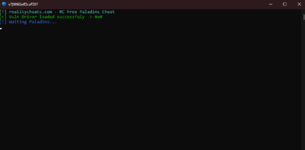
it worked thank you, would i ever need to undo what i added to cmd?1687632644956.png
 

Benzer konular


Üst