

iwystic
Veteran
10 Rozet
Seviye 10
İlk Paylaşım
Sharer I
Sharer II
Sharer III
İlk Mesaj
İlk Beğeni
İlk Çözüm
Yardımsever
Mentor
Usta Mentor
Hızlı Yardım
Profilini Tamamla
Doğrulanmış Üye



TR: Merhaba değerli RC üyeleri,
bu sorun bazı kişilerde görüldü. Bu sorunun çözümünü ve sebebini detaylıca anlatacağım.
EN: Hello dear RC members,
This problem has been seen in some people. I will explain the solution and cause of this problem in detail.
Sorunun Sebebi(Cause of the problem)

This is because your Windows Defender or Anti-Virus program is turned on.
Anti-Virus / Windows Defender does not open the cheat because it detects it as a virus and cannot inject the cheat. Your problem should be:
What most users encounter is that when you open the cheat, it throws you back to the cheat menu in 2-3 seconds.
So, why does Anti-Virus / Windows Defender detect cheats as viruses? Because the cheats are 3rd party software.

Bu sorun Windows Defender veya Anti-Virüs programınızın açık olmasıdır.
Anti-Virüs / Windows Defender hileyi açtırtmaz çünkü, virüs olarak algılar ve hile inject olamaz. Sorun sizde şöyle olmalı;
Çoğu kullanıcının karşılaştığı şey, hileyi açtığınızda, 2 - 3 saniye içinde size hile menüsüne geri atar.
Peki, neden Anti-Virüs / Windows Defender hileleri virüs olarak algılar? Çünkü, hilelerin 3. parti yazılım olmasıdır.
Sorununun Çözümü(Solution of the Problem)
1-) If you have an Anti-Virus program on your computer, you should turn it off.
2-) You should also turn off Windows Defender.
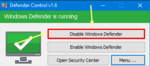
3-) If you do not know how to turn off Windows Defender, you should download and open the application from the link below and press the button in the red square. (Disable Windows Defender)
NOTE: If the problem is not resolved, you should manually turn off Windows Defender.
1-) Bilgisayarınızda Anti-Virüs programı varsa kapatmalısınız.
2-) Windows Defender'i de kapatmalısınız.
3-) Windows Defender'i kapatmayı bilmiyorsanız aşağıdaki linkten uygulamayı indirip açmalı ve kırmızı karenin içinde bulunan butonu basmalısınız. (Disable Windows Defender)
NOT: Sorun çözülmezse, Windows Defender'i elle kapatmalısınız.

Attachments


Last edited by a moderator:


