The Valorant closed beta has only been live for a day, but high demand is already causing some issues getting into the game. When trying to log in, you might be encountering some weird error codes blocking your access. Thankfully, Riot has kept in touch with players about current errors and offered updates on when to expect fixes. It's also listed the current issues, what they mean, and how to rectify them, so you won't have to desperately dig through forum threads for solutions.
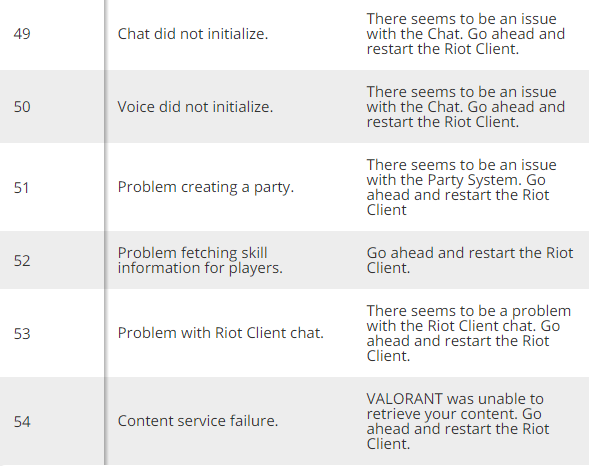
We've gathered info on Valorant's common error codes and included a full list of error codes and solutions provided by Riot on the Valorant support site.
Valorant error code 43: System time out
If you were playing Valorant's closed beta on the first day, April 7, you might have been locked out of the game client with error code 43. Don't worry, this one's not on you. Players were having trouble logging in due to heavy server overload, which gummed up the works on Riot's end. The beta seems much more stable as of this writing, but expect further issues may pop up as more players are stressing the game's servers.
Valorant error code 7: Possible suspension
According to Riot, error code 7 could be popping up for a few reasons. The most troubling reason for your disconnection is that your account is suspended, but it's also possible that Riot is experiencing issues with its platform. Riot recommends checking your email or looking for updates on Valorant's official Discord and social media channels.
Valorant installation error: restart your PC
Another common Valorant issue comes from the client's installation of Riot Vanguard, Riot's custom anti-cheat software required to play its games. Vanguard is automatically included in the Valorant game download, but installing it requires a full PC restart. Give that a shot, and continue below if your error isn't fixed.
We've gathered info on Valorant's common error codes and included a full list of error codes and solutions provided by Riot on the Valorant support site.
Valorant error code 43: System time out
If you were playing Valorant's closed beta on the first day, April 7, you might have been locked out of the game client with error code 43. Don't worry, this one's not on you. Players were having trouble logging in due to heavy server overload, which gummed up the works on Riot's end. The beta seems much more stable as of this writing, but expect further issues may pop up as more players are stressing the game's servers.
Valorant error code 7: Possible suspension
According to Riot, error code 7 could be popping up for a few reasons. The most troubling reason for your disconnection is that your account is suspended, but it's also possible that Riot is experiencing issues with its platform. Riot recommends checking your email or looking for updates on Valorant's official Discord and social media channels.
Valorant installation error: restart your PC
Another common Valorant issue comes from the client's installation of Riot Vanguard, Riot's custom anti-cheat software required to play its games. Vanguard is automatically included in the Valorant game download, but installing it requires a full PC restart. Give that a shot, and continue below if your error isn't fixed.
Every Valorant error code and what it means